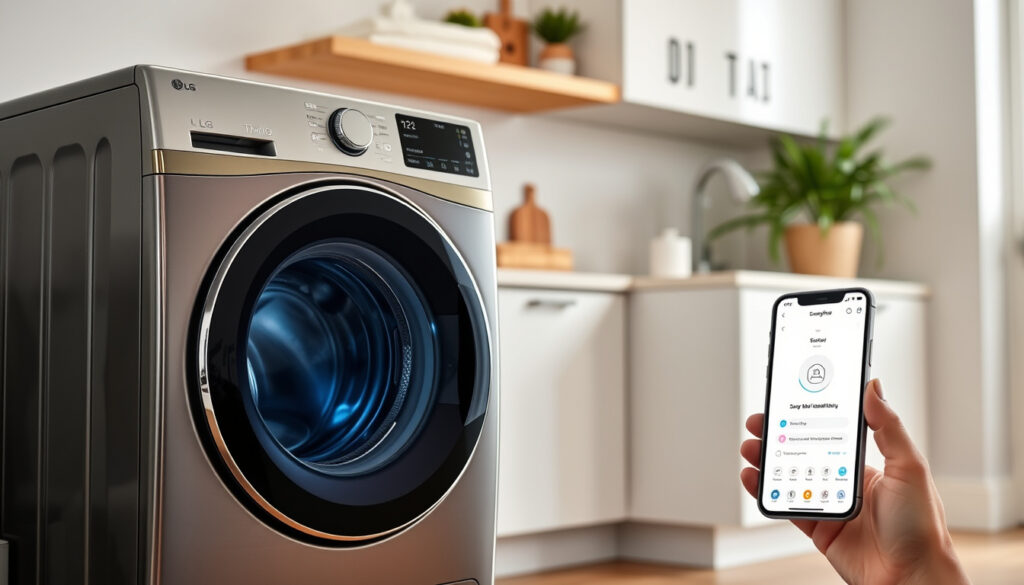
LG ThinQ Washing Machine: Setup, Reviews & Troubleshooting
Smart appliances sound great on paper, but LG’s ThinQ platform turns that promise into something you actually use. This guide cuts through the specs and walks you through everything from pairing your washer with the ThinQ app to keeping the drum clean so your clothes actually come out dry.
Capacity Options: 8kg, 9kg, 10kg, 12kg · Key Technology: LG ThinQ Wi-Fi · Wash Features: AI Wash, TurboWash · Connectivity: Smartphone app control · Models Highlighted: FH495BDN8, F4J8FH2S
Quick snapshot
- ThinQ provides Wi-Fi app control for LG washers (LG USA Support)
- Maintenance recommended once a month for front load models (LG USA Support)
- Drain filter removes counterclockwise for cleaning (LG USA Support)
- Exact lifespan varies by model and usage intensity
- Specific failure rate data not publicly available
- Aqua Reserve feature availability may differ across regions
- LG ThinQ app launched for IoT home appliances
- Getting started tutorials available from LG USA
- Regional support pages expanded across US, UAE, East Africa
- Expanded ThinQ features likely with firmware updates
- More LG washer models expected to ship with ThinQ as standard
- Potential for deeper smart home integration beyond app control
| Attribute | Detail |
|---|---|
| Technology | LG ThinQ with AI DD |
| Connectivity | Wi-Fi enabled |
| Wash Cycles | TurboWash and quick options |
| App Integration | Full remote control |
| Capacity Range | 8kg to 12kg |
| Maintenance Interval | Once a month recommended |
What does ThinQ mean on an LG washer?
ThinQ is LG’s smart home platform that brings Wi-Fi connectivity to its appliances. On a washing machine, this means you can control the washer from your phone, monitor cycles remotely, and receive maintenance alerts. The technology integrates artificial intelligence sensors that detect load weight and fabric type, automatically adjusting water level and wash duration for what LG calls “AI DD” — artificial intelligence direct drive. This isn’t a gimmick: the system genuinely adjusts settings based on what’s in the drum rather than relying on you to guess the right cycle.
The platform connects multiple LG appliances under one app, so if you also own an LG dryer or refrigerator with ThinQ, you manage them all from the same interface. Google Play describes the app as enabling “connection of IoT home appliances including washing machines for control, smart care, and automation.” For laundry specifically, the payoff is convenience: start a wash while you’re still finishing dinner, check if someone left the machine running, or get a notification when clothes have been sitting too long and need re-drying.
ThinQ technology overview
ThinQ on washers combines three capabilities: Wi-Fi connectivity for app control, AI sensors for automatic setting adjustment, and remote diagnostics that can identify error codes before you call for service. The AI DD system claims to reduce fabric damage by detecting load characteristics and choosing optimal wash motions. TurboWash technology, found on many ThinQ models, aims to complete full cycles in under an hour by combining spray mechanisms with traditional tumbling action.
AI Wash sensors mean you stop guessing which cycle to select. Load 10kg of towels and the machine knows; add a single delicates item and it adjusts accordingly. This matters most for households with mixed laundry loads who don’t want to run separate heavy and delicate cycles every time.
Benefits for washing machines
- Remote start and cycle monitoring from anywhere in range
- Push notifications when cycles complete or errors occur
- Maintenance reminders based on actual usage, not arbitrary timers
- Energy monitoring to track consumption over time
- Download additional wash cycles as they become available
How to use LG ThinQ app with washing machine?
Getting the ThinQ app working with your washer takes about ten minutes, and the process differs slightly between top load and front load models. For top load washers, the sequence starts with downloading the LG ThinQ app from Google Play, creating an account, and pressing the dedicated Wi-Fi button on the machine for 3 seconds until the icon blinks. Once the washer’s Wi-Fi network appears on your phone, you connect directly to it — the password is the last digits displayed on the machine’s screen. Open the ThinQ app, tap to add a product, and the connection confirms when the Wi-Fi LED on the washer turns solid.
Front load washers use a slightly different pairing method: open the ThinQ app, select “add product,” and either scan the QR code inside the door or enter the model number manually. The Wi-Fi LED confirms successful connection in the same way. After pairing, remote start works by pressing the dedicated button on the machine for 3 seconds before activating from the app. YouTube tutorials show the complete step-by-step process for models like the WT7405CW top loader and FHT1208SWL front loader.
Setup works, but only if you complete it in the right sequence. Skip steps or try to connect through your home router instead of the direct machine Wi-Fi, and pairing fails. The good news: once connected, the app reliably maintains its link without constant re-pairing.
App download and setup steps
- Download LG ThinQ from Google Play or the App Store
- Register an account or sign in with existing LG credentials
- Ensure your phone’s Wi-Fi is enabled and location permissions are granted
- Press the Wi-Fi button on your washer for 3 seconds
- Wait for the Wi-Fi icon to blink, then check your phone’s available networks
- Connect to the washer’s network (typically named “LG_SMART_XXXX”)
- Enter the password shown on the washer’s display
- Return to the ThinQ app and follow prompts to complete pairing
Connecting washer to ThinQ app
Once paired, the app home screen displays your washer with its current status — standby mode, cycle running, or error — and offers full control over wash parameters. The interface lets you power the machine on or off remotely, select program modes, adjust rinse cycles, set water level, modify wash time, enable soak time, and activate TurboWash. Aqua Reserve functionality lets you preserve wash water after a cycle ends rather than draining it immediately, useful if you want to reuse water for a second load or gardening.
LG’s official getting started guide confirms these capabilities are standard across ThinQ-enabled washers, though specific cycle availability varies by model. The app also pushes maintenance reminders based on usage patterns: if you’ve run heavy cycles for months, expect prompts to clean the drum or check the drain filter.
What is the most common problem with the LG washing machine?
LG’s regional support pages and service documentation reveal several recurring issue categories. The most frequently cited problem across US and East Africa LG resources is the washer failing to start — typically traced to power supply issues, faulty lid switches on top loaders, or door lock failures on front load models. A second common complaint involves clothes emerging wet after a completed cycle, usually caused by drain hose kinks or clogs, incorrect spin cycle selection, or motor and belt problems in older units.
For ThinQ-connected machines specifically, unresponsive app control most often stems from weak Wi-Fi signals or dropped connections between the washer and your router. LG’s UAE support documentation recommends the quick fix of unplugging the washer for a few minutes and restarting; if the motor has overheated from an overloaded cycle, allow a 30-minute cool-down before attempting to run another load. Factory reset procedure for unresponsive buttons involves powering off, unplugging, holding the Start/Pause button for 5 seconds, then plugging back in and restarting.
Mechanical issues overview
- Won’t start: Check power cord connection, lid switch (top load), door lock (front load), and control panel status
- Wet clothes after spin: Inspect drain hose for kinks or clogs, verify spin cycle selection, check motor and belt condition
- No water intake: Confirm water taps are open, inlet filters are not clogged, hoses are not kinked
- Excessive vibration: Ensure washer is level, check that transport bolts have been removed on front loaders
- Error codes: Use ThinQ app diagnostics or service test mode to identify specific issues
DIY fixes for common errors
LG’s official support documentation for UAE lists home repair steps for minor problems. For unresponsive controls, the factory reset procedure works reliably: power off, unplug, hold Start/Pause for 5 seconds, then reconnect. If the machine displays error codes, the ThinQ app’s diagnostic feature often identifies the issue before you need to call for service. For drain-related problems causing wet clothes, check the hose position — it should sit at proper height to allow gravity drainage without backflow.
When motor overheat triggers a shutdown from overloaded cycles, LG recommends waiting 30 minutes before restarting. Regular preventive maintenance reduces these events: cleaning the drum, checking lint filters and vents, using only recommended detergent, inspecting hoses for wear, and avoiding overload beyond the machine’s rated capacity.
Is LG ThinQ worth using?
The value proposition of ThinQ depends on how you do laundry. For households running multiple cycles daily or managing loads from different family members, the remote monitoring and cycle notifications genuinely reduce friction — you stop checking if someone’s done with the machine by wandering to the laundry room. App-based maintenance reminders also help front load owners who might otherwise forget monthly cleaning tasks that prevent mold buildup and odors.
Setup reviews from users with models like the WT7405CW note the process is straightforward once completed, though initial configuration requires patience. The LG USA official guide offers structured tutorials that make the pairing process less intimidating than it might appear. What you don’t get is fundamentally different wash quality — the sensors optimize cycles but don’t transform basic cleaning performance. If you’re buying primarily for wash results rather than smart features, ThinQ becomes a secondary benefit rather than a primary reason to choose LG.
ThinQ adds real convenience for active households but requires stable Wi-Fi and periodic app updates to maintain functionality. If your home network drops frequently or you prefer simple appliances without connectivity, the app becomes another troubleshooting task rather than a benefit.
Pros and cons review
Upsides
- Remote start and cycle monitoring from your phone
- Push notifications when loads finish
- AI-assisted cycle selection reduces manual guessing
- Maintenance reminders help prevent costly repairs
- Energy monitoring tracks consumption over time
- Water reuse via Aqua Reserve feature
Downsides
- Requires stable Wi-Fi connection to function reliably
- App needs periodic updates and maintenance
- Initial setup adds steps compared to basic washers
- Wi-Fi connectivity issues can cause pairing failures
- Some features may vary by region or model
- Privacy considerations for IoT-connected appliances
User experiences with ThinQ washers
Independent reviews and user demo videos report generally positive experiences with the ThinQ platform once past initial setup. The LG USA getting started guide is cited as helpful for first-time users, with clear step-by-step instructions for both top load and front load models. Maintenance videos and tutorial content on YouTube demonstrate the app interface, though official LG sources offer more reliable guidance than community-generated content for technical troubleshooting. Regional variations exist: East Africa LG guidance emphasizes strong spin cycles to avoid wet clothes, while US guides focus on monthly component cleaning schedules.
Do LG washers have a filter that needs to be cleaned?
Yes, and LG recommends monthly maintenance for front load washers that includes the drain filter as a key component. The drain filter sits behind the service panel and catches lint, coins, and other debris that accumulates during normal operation. LG’s official front load maintenance guide specifies the cleaning procedure: power off the machine, open the service panel, unclip the drain hose to release water into a shallow pan, then twist the filter counterclockwise to remove it. Clean the filter with a brush under warm water, reassemble, and close the panel before running your next load.
Top load washers have different maintenance requirements since they lack front-loading door seals that trap moisture. LG’s top load cleaning and maintenance guide addresses tub cleaning cycles and detergent dispenser care, but the drain filter access and cleaning frequency differ from front load models. Both configurations benefit from running a Tub Clean cycle periodically — LG’s UAE support documentation confirms this cycle reduces residue and odor buildup in the drum.
Filter cleaning guide
- Locate the service panel on the front of front load washers
- Power off and unplug the machine before beginning
- Place a shallow pan beneath the drain area to catch water
- Unclip the drain hose and allow water to flow out completely
- Twist the drain filter counterclockwise to unlock and remove
- Clean debris with a soft brush under warm running water
- Inspect the filter seal for damage before reinstalling
- Reinsert filter, twist clockwise to lock, reconnect drain hose
- Close service panel and run a short rinse cycle to verify proper drainage
Tub clean cycles and vinegar use
The Tub Clean cycle uses high-temperature water and extended tumbling to dissolve residue that builds up on the drum interior over time. LG recommends running this cycle monthly, or more frequently if you wash heavily soiled loads regularly or use cold water settings that don’t naturally sanitize the drum. For additional cleaning, some users add white vinegar to the dispenser during Tub Clean cycles — the acidity helps dissolve mineral deposits and removes mild odors without damaging stainless steel drums.
Baking soda also works as a periodic treatment: add half a cup to the drum before running an empty hot cycle. Avoid combining vinegar and baking soda in the same load — the reaction produces gas that can cause dispenser damage. LG’s regional documentation for East Africa recommends top loader models with powerful spin cycles specifically to prevent the wet clothes issue that sometimes results from inadequate water extraction during the final spin.
Neglecting monthly filter cleaning leads to drainage problems, extended cycle times, and eventually error codes that require service intervention. For households with young children or pets, checking pockets before washing prevents coins and debris from accumulating in the filter — a simple habit that saves maintenance time.
LG ThinQ Washing Machine Specifications
Four key dimensions matter when evaluating ThinQ-enabled washers: capacity, connectivity architecture, wash technology, and maintenance requirements.
| Specification | Details |
|---|---|
| Capacity Range | 8kg, 9kg, 10kg, 12kg models available |
| Connectivity | Wi-Fi enabled, ThinQ app control |
| AI Features | AI DD sensors, automatic load detection |
| Quick Cycles | TurboWash, 15-minute quick wash options |
| Remote Start | 3-second button hold activates app control |
| Maintenance Interval | Monthly recommended (front load) |
| Wi-Fi Activation | 3-second dedicated button hold |
| Factory Reset | Hold Start/Pause 5 seconds (power off and unplugged) |
| Motor Cool Down | 30 minutes after overload shutdown |
| Water Management | Aqua Reserve retains water post-wash |
Related reading: Samsung Stick Vacuum NZ Best Models Reviews Prices
youtube.com, youtube.com, youtube.com, youtube.com, lg.com, youtube.com, lg.com, play.google.com, lg.com, youtube.com
When evaluating if the LG ThinQ is worth buying, recent LG vs Bosch rankings highlight key reliability differences among top models.
Frequently asked questions
What do the symbols on my LG washing machine mean?
LG washers display cycle icons that represent specific wash programs: a tub with water level indicates normal wash, a shirt icon signals permanent press, a swirl or spiral represents delicates, and a tub with a clock marks quick wash. The user manual for your specific model includes a full legend, or you can access digital manuals through the ThinQ app for connected models. Understanding these symbols helps you select appropriate cycles without relying on factory defaults every time.
What is the lifespan of an LG washer?
LG washers typically last 10-15 years with proper maintenance, though actual lifespan varies based on usage frequency, water quality, and whether recommended maintenance schedules are followed. Front load washers with regular Tub Clean cycles and filter maintenance tend to outlast those neglected in humid environments where mold and mineral buildup accelerate wear. ThinQ-connected models have additional electronic components that could theoretically fail before mechanical parts, but LG’s build quality generally supports decade-plus service lives.
Is a 15-minute quick wash enough?
The 15-minute quick wash cycle works adequately for lightly soiled clothes worn once or twice — workout wear after a single session, summer clothing with minimal perspiration, or items dropped in a suitcase. It’s insufficient for heavy soil loads, heavily soiled children’s clothing, or items that typically require pre-treatment. Quick wash uses higher spin speeds and shorter wash phases, so fabric agitation time is reduced. For mixed households, reserve quick wash for its intended purpose rather than treating it as a universal cycle.
Can I put vinegar and baking soda in my washing machine to clean it?
Yes for vinegar used alone during Tub Clean cycles, added to the detergent dispenser or directly to the drum. No for combining vinegar and baking soda in the same load — the chemical reaction produces carbon dioxide gas that can damage dispensers and internal components. If you want both treatments, run them separately: vinegar cycle one week, baking soda cycle the next. Both treatments work on stainless steel drums without damage when used as directed.
How to deep clean an LG top load washer?
Top load deep cleaning differs from front load maintenance because there’s no door gasket to scrub and no drain filter requiring monthly attention. Run an empty hot cycle with two cups of white vinegar or a commercial washing machine cleaner, using the deepest water level setting. Remove and hand-wash the detergent dispenser with warm water and a brush, inspecting for residue buildup. Check the agitator area for debris caught in the vanes, and wipe the drum interior with a damp cloth if stains persist after the cleaning cycle.
What are common LG washing machine mechanical issues?
Most frequent mechanical issues include failure to start (lid switch or door lock problems), excessive vibration during spin cycles (unlevel installation or worn shock absorbers), and incomplete drainage (clogged drain filter or kinked drain hose). Motor failure or overheating typically indicates overload usage beyond the machine’s rated capacity. Electronic control board issues manifest as unresponsive buttons, cycling errors, or display failures — LG’s factory reset procedure resolves many button-responiveness problems before service intervention becomes necessary.
What owners and experts say
Regular maintenance should be performed approximately once a month, and be performed on each section of the washing machine.
— LG USA Support (Official Maintenance Guide)
Enjoy the convenience of managing your washing machine settings right from your mobile device.
— LG ThinQ Tutorial (Official Voiceover)
For anyone juggling laundry between work, kids, and other obligations, the ThinQ platform addresses a real friction point: knowing when the machine finishes without checking it constantly. Remote start and cycle notifications won’t fix a poorly configured drain or replace monthly maintenance, but they reduce the low-level anxiety of wondering whether someone remembered to move a load. The practical question isn’t whether ThinQ technology works — the app pairing process, Wi-Fi activation timing, and diagnostic features all function as described in official documentation. The question is whether you value enough convenience to manage one more connected device.
More related posts
 Car Hire Auckland Airport: Compare Cheap Rentals & Deals
 Best Sushi Places in Tokyo: Michelin Stars to Hidden Gems
 No 1 Shoes NZ: Locations, Deals & Shoe Guide
 Best Face Sunscreen for Men: Top Picks & Expert Advice
 Is Harbour Bridge Open Today – Live Status, Closures & Updates
 SBW vs Gallen Fight Time: Australia, UK, NZ Start Times
 Bed Bath & Beyond Richmond: Closure and Alternatives
 Auckland to Manila Flights: Compare Cheap Airfares & Book